5 Hidden Features of the Arc Mouse You Must Know About
Category: Electronics
Introduction
The Arc Mouse has become a popular choice for people who prioritize portability, sleek design, and a clean desk aesthetic. At first glance it looks like a minimalist travel mouse: thin, curved and simple. But beneath that slender profile are several useful features that frequently go unnoticed by new owners. This article uncovers five of those hidden capabilities, explains how they affect everyday use, and helps readers decide whether an Arc Mouse suits their workflow. The coverage is model-aware—some Arc variants expose specific behaviors—so readers will get practical, real-world guidance that buyers typically care about: battery life, ergonomics, surface compatibility, customization, and travel convenience.
Detailed product analysis: What makes the Arc Mouse special
The Arc Mouse family emphasizes a design-first approach. The defining characteristic is the arc-shaped profile that flips between a flat state and an arced state. That simple mechanical action unlocks several behaviors beyond mere aesthetics. In addition, many Arc models use a touch-sensitive top for scrolling and adopt Bluetooth Low Energy (BLE) for wireless connectivity. Taken together, these design choices place the Arc Mouse in the “travel-friendly, workspace-minimalist” category, where buyers often weigh compactness against long-term comfort and functional richness.
Hidden feature 1 — Flatten-to-power-off and instant sleep behavior
One of the most useful features that many people only discover after a few weeks of ownership is the Arc Mouse’s automatic power behavior. When the mouse is flattened it typically enters a deep sleep or fully powers off; curving it back into the arced shape wakes it and reconnects to the host. This is not only elegant from a product design perspective, it has concrete benefits:
- Battery savings: Manual on/off switches are unnecessary; the mechanical state provides reliable power control without extra effort.
- Travel safety: Flattening the mouse protects the touch surface and prevents accidental clicks or scrolling while packed in a bag.
- Reliable wake: In many setups this physical wake is fast and predictable—useful for commuters and people who switch between laptop and tablet frequently.
Real-world use case: a commuter who keeps the mouse in a laptop sleeve can flatten it to avoid accidental battery drain and then arc it open on the train to resume work immediately.
Hidden feature 2 — Touch surface scrolling and precision modes
Several Arc models replace a dedicated scroll wheel with a touch-sensitive strip or a full-length touch surface. That surface provides one-dimensional vertical scrolling and, on some variants, toggles between a ratcheted (notched) scroll feel and a smooth free-scrolling feel. These subtle behaviors are easy to miss if owners continue to treat the device like a conventional mouse.
- Ratchet vs smooth: Ratcheted scrolling gives tactile feedback for line-by-line navigation—handy in long documents or code—while smooth scrolling allows fast scrubbing through timelines or long web pages.
- Precision control: The touch surface can be used for fine adjustments when editing media timelines, zooming in long spreadsheets, or scrolling through long articles without moving the pointer.
- Gesture possibilities: Depending on the OS and drivers, the touch strip can map to additional gestures (two-finger swipe equivalents, back/forward navigation), improving productivity in supported workflows.
Real-world use case: a video editor can scrub through a sequence more fluidly with smooth touch scrolling, then switch to the notched mode when making frame-precise cuts.
Hidden feature 3 — Lightweight but surprising surface compatibility
Many buyers worry that compact travel mice will perform poorly on unusual desk surfaces. Arc models typically employ optical or BlueTrack-like sensors with broad surface compatibility. While performance varies by model and firmware, owners will often find the mouse works acceptably on wood, fabric mousepads, and many stone or laminate desks. The key hidden aspect is how adjustments in surface and hand pressure change tracking behavior.
Looking for the best Electronics deals on Amazon?
See Deals →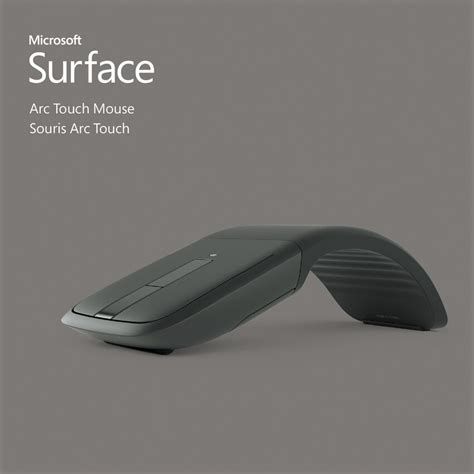
- No pad required for general use: For office and café work, the sensor is usually tolerant enough to eliminate the need for a dedicated mousepad.
- Glass and mirrored surfaces: Tracking on pure glass is commonly problematic for many small mice; placing a thin mat or paper under the mouse typically solves the issue.
- Fine-tuning sensitivity: Small DPI increases in driver software can make the mouse feel smoother on low-contrast surfaces.
Real-world use case: a remote worker who alternates between a standing desk and a café table can skip the mousepad most days but should carry a thin slip of paper or cloth when using glass café tables.
Hidden feature 4 — Customization through platform drivers and remapping
Out of the box, the Arc Mouse provides core functionality—left/right click, scroll, and pointer movement—but deeper customization arrives through official driver utilities or third-party remapping tools. This is an often-overlooked capability because the device’s minimalism suggests "what you see is what you get."
- Button remapping: Left and right clicks can often be reassigned to macros, application shortcuts, or double-click behaviors via a manufacturer’s customization app.
- Sensitivity adjustment: DPI or pointer speed can be tuned in software to reduce wrist movement or increase cursor precision.
- Gesture assignment: Where supported, the touch strip can be assigned to navigate browser history, control media playback, or trigger productivity shortcuts.
Real-world use case: a spreadsheet analyst can map the touch surface to page-up and page-down in one application and leave it as standard scroll for others—speeding through reports without switching tools.
Hidden feature 5 — Travel and pocket ergonomics that reduce micro-friction
For frequent travelers micro-ergonomics matter: how the mouse fits into pockets, how it feels during short bursts of use, and how reliably it wakes from sleep. The Arc’s flattening mechanism and ultra-thin profile reduce friction against other objects in a bag and reduce accidental activation. There’s also a subtle ergonomic benefit: arcing the device changes how the hand angles over the mouse, which can reduce ulnar deviation (the sideways bend of the wrist) compared with a completely flat travel mouse.
- Slip-friendly footprint: The flattened shape is less likely to snag on cables or sleeve seams.
- Reduced accidental inputs: Flattening prevents the touch surface from being engaged while packed.
- Short-session comfort: The arc shape provides a natural hand contour that can be more comfortable during brief use than aggressive palm-shaped mice intended for long desktop sessions.
Real-world use case: a salesperson who frequently presents from a laptop prefers the Arc because it fits in a folio and provides a consistent, comfortable pointer during short demos.
Pros & cons
- Pros
- Extremely portable—flattens to a slim profile for easy packing.
- Automatic power control via arc/flat position saves battery life.
- Touch-based scrolling provides smooth, precise navigation for long documents and media timelines.
- Works well on a variety of everyday desk surfaces without a dedicated pad.
- Minimalist aesthetic and build quality often match modern laptop designs.
- Cons
- Not ideal for long daily sessions—compact size can sacrifice full palm support.
- Advanced gestures and remapping may require drivers that are Windows-centric; macOS and Linux support can be limited or rely on third-party utilities.
- Glass surfaces may still need a workaround (mat or paper) for reliable tracking.
- Touch scrolling has a learning curve for users coming from physical scroll wheels.
Comparison table: Arc Mouse vs typical alternatives
| Feature | Arc Mouse (compact travel) | Traditional Travel Mouse (small, non-folding) | Full-size Productivity Mouse |
|---|---|---|---|
| Portability | Excellent — flattens for storage | Good — small but fixed shape | Low — bulky, designed for desktop use |
| Power control | Auto sleep / flatten-to-off | Manual switch or always on | Manual switch or smart sleep |
| Scrolling | Touch strip (smooth/ratchet on some models) | Small physical wheel | High-precision wheel with tilt and free-spin |
| Ergonomics (long sessions) | Moderate — better for short sessions | Variable — usually not for extended use | Excellent — designed for all-day use |
| Customization | Good with drivers, model dependent | Limited | Extensive — profiles, buttons, DPI |
| Surface compatibility | Wide, but glass can be problematic | Good | Best — advanced sensors handle glass better |
| Best for | Commuters, minimalists, presenters | Basic travel users | Power users, creative professionals, gamers |
Buying guide: What to consider before choosing an Arc Mouse
When evaluating an Arc Mouse, buyers typically weigh several practical factors. The sections below break down the most common concerns and provide guidance to match the mouse to specific needs.
1. Intended session length
If most work sessions are short—30 to 90 minutes—the Arc Mouse often provides adequate comfort while offering portability. For extended daily use (multi-hour sessions), a larger ergonomic mouse with full palm support is usually preferable. Buyers should test hand posture if possible or plan to pair the Arc with periodic breaks and ergonomic stretches.
2. Operating system compatibility
Windows users benefit most from official driver support that unlocks remapping, sensitivity adjustments, and gesture assignments. macOS users get core pointing and scrolling, but some advanced customizations may require third-party utilities. Linux support is generally basic: Bluetooth pairing and pointer movement work, but touch gestures and special mapping features may not be available without community tools.
Discover deals on Electronics — updated daily.
Browse Now →3. Surface and workspace
Consider the primary surfaces you will use. The Arc Mouse works well on wood, many laminates, and cloth pads. For regular use on glass desks or highly reflective surfaces, keep a small soft mat or even a thin paper sheet in your laptop sleeve to improve tracking when needed.
4. Scrolling preference
Users who prefer a physical scroll wheel with tactile notches might find touch-based scrolling unfamiliar at first. Several Arc models offer a switchable scrolling feel, while others favor a single smooth experience. If precise incremental scrolling is critical (for software development or spreadsheet navigation), test the scroll mode before committing.
5. Battery and charging
Arc variants range from replaceable-cell designs to built-in rechargeable batteries. For travelers who don't want to carry spare batteries or a charging cable, rechargeable models reduce accessory clutter. Conversely, users who travel to places with limited charging access may prefer replaceable cells for quick swaps.
6. Customization needs
Assess whether the ability to remap buttons, set DPI levels, or assign gestures is essential to the workflow. If so, confirm driver availability for the user’s OS. For shared laptops or multi-OS environments, look for solutions that maintain sensible default behavior when driver features are unavailable.
7. Portability vs comfort tradeoff
The Arc Mouse is a design-focused compromise: it favors portability without fully replicating the ergonomics of larger mice. Buyers should weigh how often the mouse will be carried versus how many hours per day it will sit under the hand. If the device will spend more time in transit than on the desk, the Arc’s advantages compound; if it will be used for full-day desk work, a larger mouse may be a better investment.
Practical tips and care
- Flatten the mouse for travel to prevent accidental activation and to protect the touch surface from scratches.
- Carry a thin cleaning cloth to keep the touch surface free of oils and debris that can affect scrolling responsiveness.
- Keep a small slip of paper or a low-profile mat in the bag when you expect to use glass or mirrored surfaces.
- Install official driver software on primary workstations to unlock remapping and pointer tuning, while relying on default Bluetooth behavior for secondary or guest machines.
- If sharing the mouse between devices, pair management is simpler when each device keeps a remembered pairing entry; check the host OS’s Bluetooth list rather than re-pairing each time.
Conclusion
The Arc Mouse is more than a stylish travel accessory. Its flatten-to-off design, touch-based scrolling, adaptable surface performance, and driver-enabled customization make it a clever tool for commuters, presenters, and anyone who values a minimalist workspace. The five hidden features highlighted here—automatic power behavior, touch scrolling modes, surface compatibility, customization options, and travel ergonomics—explain why many users find the device unexpectedly practical. As with any compact mouse, the tradeoff between portability and long-session comfort is real; picking the Arc Mouse is a decision that should match how often the device will travel versus how long it will be used at a desk. For those who prize pocket-friendly design and straightforward utility during short-to-medium sessions, the Arc Mouse is worth considering as a reliable, elegant pointer.